Showing posts with label Clocks and Resets. Show all posts

Saturday, 27 August 2016

Free Timing Diagram Drawing Tools

In the VLSI industry, it is a requirement to come up with timing diagrams for the operations of circuits, blocks and IPs. It is also required at times about how the blocks interact with each other. This timing information is captured using waveform in the Design Specification docs and also in testplan many a times. In such a situation there is a requirement to draw the diagrams showing the relations ship between different signals and their alignment with the clock. 

Though you can get the job done using Microsoft Powerpoint/Microsoft Visio/Microsoft Excel, however, there are multiple online free tools available to make timing diagrams in the format we want(and also in lesser time than above and hence contributing to our productivity).

I am listing some of the tools which can be used(My personal favorite is WaveDrom. It even has a dedicated SNUG paper for it)

  • WaveDrom - It can be installed in your computers or can be run online to create timing diagrams. It creates timing diagram using simple textual inputs (basically a javascript).  Here's the link to SNUG paper on it. The link has a tutorial also and it is very easy to use.Below is the sample image generated from WaveDrom :

                                                                     Fig 1. Timing Diagram from WaveDrom
  • DrawTiming - It is also a very simple tool with a command line interface which allows you to write scripts(pretty intuitive). Below is a sample image from the tool site :

                                              Fig 2. Timing Diagram from DrawTiming

  • Timing Editor - It is another free waveform editor which can be used to create timing diagrams.
  • Timing Diagram Font - This software allows to generate timing diagrams in MS Word font. An example GIF generated using above tool is provided below(from the given link only)
Fig 3. Timing Diagram from Timing Diagram Font

I found above tools pretty interesting to play with and they save time while working.

I hope above tool will also help in your journey.

Let me know if you know of any other tool which is simpler to use than above. 

Till next post !!!

***Please note the images put in above figures are taken from the tool sites respectively. I dont have a copyright on above images.

Saturday, 13 September 2014

Standard Clock Gate Cell

Moving ahead from my last article on Clock gating(You can read the previous article here : Low Power Techniques - Clock Gating), this small article introduces the standard “Clock Gate Cell” This cell is available to all the designers in semiconductor industry along with the other standard cells in their libraries. It is good to recognize early that clock and power are mingled up and clocks provide a good deal of avenues for saving power. So knowing more about clocks is always a plus to person interested in designing "Power Aware Circuits".

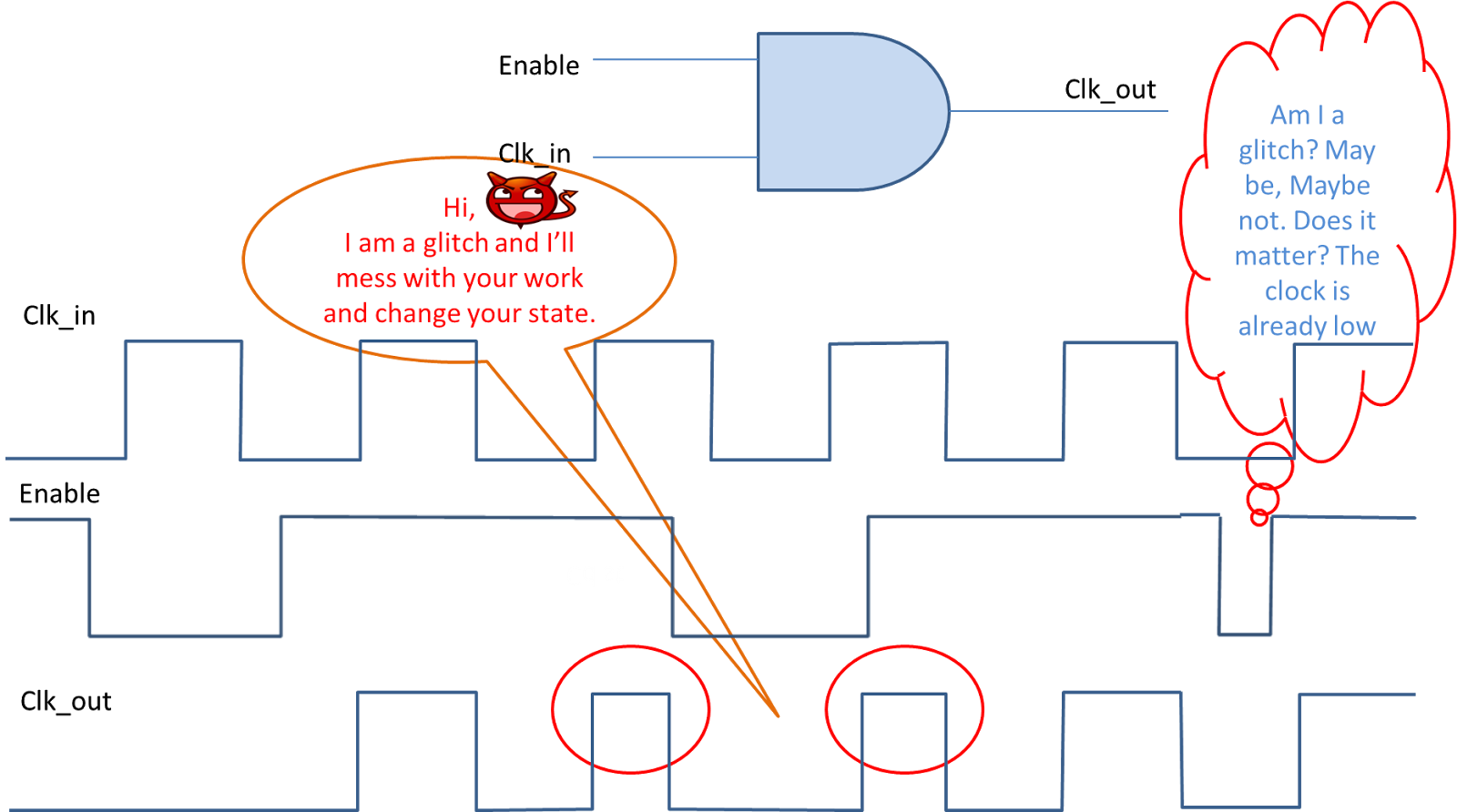
In the last article, we saw that there was a glitch in “certain cases”, when we gated the clock. These “certain cases” led to the development of this cell. If you look more closely at the waveform given in last article (reproduced below for convenience), the glitch will always be there whenever the enable signal goes down and the clock is high (high as in logic 1) .
Fig 1. AND Gate as a Clock Gate and Problem of Glitch (Reproduced from Low Power Techniques- Clock Gating)

The above observation is simple enough to propose a solution for the glitch problem in AND gate. Fig 2. shows the clock gate cell. 
Fig 2. Clock Gate Cell


This cell stops the clock without any glitch in the output.  And how does it do that? It utilizes a LATCH for this purpose. 

-----------------------------
Latching Mechanism
-----------------------------
A latch is a level sensitive device in which the output is same as input till its Enable signal is at a particular logic level. Generally logic 1 is the chosen level for this matter. The output traces the input till the Enable signal is logic 1 and as enable is switched to logic 0, the output retains the last value it captured from the input till the next enable comes where it starts tracking the input again.

------------------------------------------------------------------
Latching Mechanism as used in Clock Gate Cell
------------------------------------------------------------------

For clock gating purpose the enable signal of latch is tied to the inverted clock signal (Clk_in) so that output changes only when the clock is at a particular logic level (which is logic 0 in our case). So it is easy to see that we can pass Enable signal and the changes will be recorded only when the logic level is low (or logic 0) and then AND this with the clock signal. This will ensure that that the Enable low is recorded only when the Clk_in is low and hence no glitch in the output.

Note that we have inverted the clock before sending it to the latch so as to ensure that the latch is sensitive to logic 0 of Clk_in (since the latch itself is sensitive to logic 1). Before I proceed further, I would like to point out that a latch is a very powerful tool available to designers and it is used in multiple circuits (it will be a hot topic in some of the coming articles). With above cell Fig 1. modifies to Fig 3. as below :

Fig 3. Timing Waveform for Clock Gate

In the above figure notice how the enable edges which happened during the clock high have been translated or rather delayed in the clock low domain.

We can use this cell to TURN OFF an entire clock domain or TURN OFF only a few flops. It is entirely on designer that how much power he wants to save and according to that we have levels of clock gating in any SoC. Also note that these Enable signals are controlled by Finite State Machines (FSMs) which trigger based on inputs from other FSMs in SoC.


A small point to all the above information is : Clock gate is a HW means to control the clock signal there are software means as well in which we program the PLL itself to control the entire clock tree. 

I conclude this article here with these lines of Dr. Thomas Fuller :
"Let not thy will roar, when thy power can but whisper"

Saturday, 30 August 2014

Low Power Techniques : Clock Gating

Disclaimer : All the articles are written with an assumption that the reader has a basic knowledge of Boolean Gates and digital elements.

In this article, the key focus of discussion would be clock gating and its impact on the design on modern day SoCs. Clocks could be considered as the Arteries (or Veins so for the matter) of the entire SoC and clock source being the heart of any SoC. All the IP’s like CPU, Audio, Display, USB, etc require a clock to function. It is the “CLOCK” which gets to decide the maximum speed of operation for any SoC (Here I am not considering the throughput increase due to the various kinds of architectures employed in designing the SoC) and hence special attention should be given to this signal.

Another reason why this signal should be given more attention is due the fact that it is the highest toggling signal in any SoC and therefore consumes the largest fraction of entire SoC power. In a typical SoC for mobile application, the clock tree consumes 30-40% of the power (Yes, this number can be more depending on the Clocking architecture employed).

Clock gating is a technique to turn the clock OFF depending on the requirement or the use case. How this is achieved is the main focus of this topic.


There are essentially two ways to gate the clock. One through hardware control and one through software control.

The software control is through registers which are used to control the PLL or DLL or any other clock source that we may have. We turn the PLL/DLL/Source off (which is in itself at times a complex process) by following a specific sequence. Turning of the source is a method to gate the trunk of the clock tree (I’ll talk about the Industry lingo on clocks in an upcoming article. Kindly bear with us on terms like trunk, branch, etc).
It may happen that in some of the cases we want to shut only a branch of the trunk. This is the point where hardware control comes in picture.

This article (and some subsequent articles) will discuss on hardware control of the clock.

Below is shown a free running clock :


Fig 1. Free Running Clock
---------------------------------------------------------------------------------------
How can we actually stop it based on some control signal say “enable”?
---------------------------------------------------------------------------------------

Yes, you got it right, we need to AND the two signals and put the enable to be at “1” when we need the clock and “0” when we don’t want the clock output for any IP.
The figure below shows a simple AND gate being used as a gate.


                                       Fig 2. AND Gate as a Clock Gate and Problem of Glitch

So do we actually use this “AND” gate in our SoCs to gate the clock from reaching to any IP?

You guessed it right. No, this is not the standard cell which any modern day SoC use. The reason is clear from above figure itself. If the enable signal changes while the clock is high, this will lead to a runt pulse termed as “Glitch”. A glitch is harmful for any SoC as it can lead to unknown states or the states which we don’t want our system to be in. For now, I’ll leave the glitch to a-not-so-far-in future article.

I’ll discuss about “Clock Gating Cell” in the next article.


Till then, Enjoy!!! 

Sunday, 10 August 2014

Resets - II

Continuing from our last article, Resets - I , this article discusses the synchronous resets mentioned earlier and evaluates its pros and cons.

Before continuing forward, a basic knowledge of the "Flip Flop" is assumed.

Synchronous Resets

Synchronous is derived from two terms “syn” meaning “same” + “chronos” meaning “time” and how do we denote time in our systems? The answer is Clocks. So going by the name, this reset occurs when the reset is HIGH/LOW (depending on the type of reset) at a rising/falling clock edge (again depending on whether the flop is positive edge triggered or negative edge triggered). If the reset goes high (Assuming reset=1 put Q=0) in between any time t, t+T (where T is the time period of the clock) and comes back to “0”, the reset will not be registered. Or in other words there is no difference between the D signal (Assuming a D type flop which is the industry standard) and the reset signal as both of the signals are sampled at the positive/negative edge of the clock.
Consider the diagrams below and it will make more sense:


Fig 1. D Flip Flop


                                              Fig 2. Timing Diagram for D Flip Flop in fig1.
Note that in above diagram we have assumed a Zero delay model for each of the signals (Which is a deviation from the real world as it has delays, I will come back with more on this)
From above diagram it is easier to see that No matter what the value of D_flop (which is the D input of the flop ) while the sync_reset is high, the Q_flop will be "0". Once the reset has been removed, Q_flop follows the D_flop.

The plus points of the synchronous reset are clearly visible:
1.      It helps in glitch filtering (If they do not occur near the clock edge then the glitch will not cause any harm to the circuit).
2.      Also the (not so visible point) is that the flop circuit is simple and hence consumes less area.
3.      The resulting system is completely synchronous

The negative point lies in the plus point themselves:

1.      It requires a clock in order to be sampled.
2.    The applied reset will have to strictly adhere to the requirements of setup and hold times (provided in the “SPEC” sheet of the Flop) so that there are no timing issues.
3.     One big problem which arises while using this kind of reset (because of the fact that they are similar to data signals) is the synthesis. The synthesis tool may not be able to differentiate between data and the reset as both are being sampled on the clock edge. It becomes necessary then to tell the tool to add certain “directives” which tell it that the input to “S or R” pin of the flop is a “set or reset” signal.
4.   Also it may happen that the reset signal becomes the fastest timing path and then would need a timing closure  as it would be the critical path, which we generally don’t want. 

Synchronous designs have been the preferred design for designers for the last few decades but with increasing 
complexity newer approaches are being adopted by the industry (GALS being one of them which I mentioned in
an earlier post).

Hope you liked the article.

Your feedback and comments are welcome.

Upcoming Post : Reset - III


Sunday, 3 August 2014

Noise and Jitter

In this article I will talk about the relation between noise (by Noise here I typically refer to Ground or Power Supply variations) and jitter.
Consider the diagram shown below which shows a variation in VDD/GND rail. Let us say that the maximum variation (end to end) that occurs in the PWR or GND rail is X. This variation has a relation with the clock transitions that occur in the clock buffer used for distribution. Or in other words the variation X directly translates in the form of jitter in the Clock Distribution Buffer.
                                                             Fig 1. Noise in PWR/GND Rail 
Because of above variation in the rail, the transition time for a clock buffer changes which lead not only to more power consumption (How? Can you answer? I will discuss this in some other article but for now we can live with the fact that lower transition rate leads to higher power consumption) but also to jitter. The diagram below shows how such a thing happens:
                                                  Fig 2. Noise to Jitter Translation in Clock Buffer
The region Y above (which typically in a chip denotes the time difference between the 90% of clock high voltage level and 10% of clock high voltage level and can be put into memory as a rule of thumb) is the region where threshold transition of the logic level happens(region Z). Transition in logic level refers to change in logical “0” to logical “1”. This region is directly dependent on the X. The more the X, the greater will be the value of Y and this will lead to more power consumption. In short Jitter has a relation with Noise which can be described as:
Y (Jitter) = X(Noise) * dt/dV
where dt/dV is the inverse of slew rate for the clock.
Note that it is X that adds randomness to the jitter phenomenon.
In short in order to have low jitter it is necessary to control GND/VDD Bounce. These variation lead to other issues which I will cover in some future topic.


Feedback and comments are welcome.

Upcoming Post :  Synchronous and Asynchronous Reset

Sunday, 27 July 2014

Resets - I

Why do we need RESETS?

Resets in any SoC (or for the matter in any complicated chip) are required to put it in a known or sane state. An example of resetting is when our mobile phone hangs we generally shut it down so that it comes back to normal state (Shutting down is equivalent to resetting it). Similarly resets are required so that any SoC can be brought back to a default state.


                                                           Fig 1. D type Flip Flop with Reset Pin
During the design phase we apply reset while simulating the design, the resets are used to ensure that the initial state of system is known and then we force them into the other states for the purpose of simulation. Also they ensure that the hardware is in a known state as circuits have no inbuilt method for self- initializing them. For a real hardware system or board, when we power up the system we reset everything so that we know which register contains what before we start any other operation on it. A typical modern day SoC contains hundreds of register and knowing the state of each register is almost impossible unless we reset them in the start and then put them into operational states.

Another use case of reset is in watchdog counter circuits. I will talk about watchdog circuits in a later post, but for now I can tell that watchdog circuits are used to ensure that the circuit does not enter into a deadlock state. For e.g assume that two processes are running in parallel on a system. Let us call them Process A and Process B. Process A wants to use a system resource and it issues a request for using it and at the same time Process B wants to use the same resource and it also issues the same request (resource here refers to a hardware resource). Since both the requests are issued at the same time, each process will assume that the resource is busy and being used by another process and this will go on indefinitely with neither process using the resource. In order to get out of such a situation we have a counter circuit which times out after a certain number of clock cycles and then either of process can use the resource.


Above was one example of a deadlock, there are other examples as well, I will discuss about them in some future post. For now let us talk about the type of resets which are currently in use.

There are two types of reset methodologies which are in current use. 
1) Synchronous Resets
2) Asynchronous Resets

With increasing complexity of chip these days, the systems are moving towards GALS (Globally Asynchronous Locally Synchronous) methodology of using resets. In fact, the clocking methodologies are also following the same trend. I will discuss in more details about GALS in another post when I will discuss the different clocking methodologies under use in different modern day SoCs.

Feedback and comments are welcome.

Next Post : Resets - II